My friend NapalmTheElf has launched his own blog over at http://napalmtheelf.wordpress.com/
go visit it for his wit, his charm, his forthright opinion and because I said so!
Monday, 15 December 2008
Thursday, 11 December 2008
So google released their zeitgeist for 2008, the fastest growers this year are:
1. sarah palin
2. beijing 2008
3. facebook login
4. tuenti
5. heath ledger
6. obama
7. nasza klasa
8. wer kennt wen
9. euro 2008
10. jonas brothers
It's been a big year for the Internet.
From BBC's iPlayer to Facebook to YouTube, many of the top searches in Britain this year have been for our favourite websites. We also see three web-savvy politicians come tops in searches
Fastest Rising
1. iplayer
2. facebook
3. iphone
4. youtube
5. yahoo mail
6. large hadron collider
7. obama
8. friv
9. jogos
10. wiki
Most Popular
1. facebook
2. bbc
3. youtube
4. ebay
5. games
6. news
7. hotmail
8. bebo
9. yahoo
10. jobs
Politicians (Most Popular)
1. gordon brown
2. david cameron
3. barack obama
4. tony blair
5. sarah palin
6. john mccain
7. george osborne
8. alistair darling
9. boris johnson
10. nicolas sarkozy
Recipes (Fastest Rising)
1. cupcake
2. meatballs
3. rocky road
4. crumble topping
5. eaton mess
6. pork belly
7. rhubarb fool
8. lemon posset
9. honey comb
10. beer batter
Finance terms (Fastest Rising)
1. icesave
2. hot uk deals
3. natwest
4. hmrc
5. hbos
6. money saving expert
7. halifax
8. barclays
9. rbs
10. lloyds tsb
Hottest tickets (Fastest Rising)
1. oasis
2. leonard cohen
3. ac/dc
4. the ashes
5. steve coogan
6. sos
7. oliver
8. gladiators
9. tina turner
10. nickleback
Thursday, 20 November 2008
Official Gmail Blog: Spice up your inbox with colors and themes
G mail launched their new Built in themes today, still haven't shown up yet on my g mail account (even though I was one of the first to get one when they launched)
Official Gmail Blog:
Spice up your inbox with colors and themes
Official Gmail Blog:
Spice up your inbox with colors and themes
Thursday, 2 October 2008
CSRF
CSRF as it will be known as from now on also known as Cross site request forgery is, in my opinion, an underestimated bug that may occur in quite a lot of web applications.The reason for this is because a lot of web devs assume users will be logged in when they view a given page. So unless they are practically wary will not require a user name and password for every single action the user does. Lets face it, this would get really annoying, really fast and make people less likely to want to bother using this site in the future because of all the hassle.
This attack works by submitting data from an attacker defined form to a form of a target site. After a site I often frequent, decided to fix the XSS bug in one of their pages that I used to annoy people with, I decided to sit down for awhile and try to break it again.
Basically what I did was craft a HTML page hosted on a remote server, that submitted a form using JavaScript. It changed the users email address (which coincidentally resets their password ;)) This code is pretty self explanatory, it runs myform.submit() which submits the form with the name "myform" (duhhhh), stick the target target page in the action parameter and the name of the text box you want to send data for (currently set to targetfield) and its content (newvalue).
Unfortunately blogger won't let me include the html (even when converted to html entities) so here's a pastebin link
Tuesday, 26 August 2008
Error
Sorry there was a slight error in the post about the rapid share download/wget thing, I mistyped the cookie name - I have since edited it so it works - sorry for the issues it might have caused!

Saturday, 23 August 2008
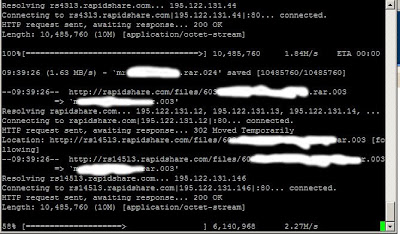
Rapidshare wget console for linux
OK so I have a nice connection both at work and home, trouble is both of them have fair usage policys, which basically suck when I want some stuff from rapidshare.
Now this little trick requires a few things, they are:
1, a premium RS account (its cheap you wasters!)
2, You need to log into your account via a normal webbrowser ONCE to set a setting
3, access to a console on a *nix box ;)
OK so first go into your normal browser like FFx or IE and log into your premium account, and goto the settings and select the tick box for "direct downloads", now save that and log out - from here on in you can use console :)
ok now in your console type the following;
wget --save-cookies=rscookie -q --post-data="login=[user]&password=[password]" https://ssl.rapidshare.com/cgi-bin/premiumzone.cgi
obviously replace [user] and [password] with your account details (and minus the []'s)
Now create a list of links you want to download and call it something like "links"
now all you have to do is loop over the urls in the links folder and supply the cookie from earlier
for i in `cat links`; do wget --load-cookies=rscookie $i;done
and your done :D
Now this little trick requires a few things, they are:
1, a premium RS account (its cheap you wasters!)
2, You need to log into your account via a normal webbrowser ONCE to set a setting
3, access to a console on a *nix box ;)
OK so first go into your normal browser like FFx or IE and log into your premium account, and goto the settings and select the tick box for "direct downloads", now save that and log out - from here on in you can use console :)
ok now in your console type the following;
wget --save-cookies=rscookie -q --post-data="login=[user]&password=[password]" https://ssl.rapidshare.com/cgi-bin/premiumzone.cgi
obviously replace [user] and [password] with your account details (and minus the []'s)
Now create a list of links you want to download and call it something like "links"
now all you have to do is loop over the urls in the links folder and supply the cookie from earlier
for i in `cat links`; do wget --load-cookies=rscookie $i;done
and your done :D

Friday, 22 August 2008
Occurance...
It has just occured to me that all the posts that I transfered over from aheadofthetimes.co.uk are in the wrong bloody order, they will have to stay this way because I can not be bothered to reverse the order...so erm from this point downwards its all just for archieving purposes...from this point up its going to be new posts only.
sorry for the stupid error :(
FC
sorry for the stupid error :(
FC
Friday, 25 July 2008
SSH - Shitty Stupid Hack
Well this week has been rather filled with disaster, one of which is my remote ssh connection got broken. It seemed that if I logged in on the local network all was fine, logging in from the outside world the ssh connection would hang if i got the password right!
Now I have seen this question asked many many times on forums and websites generally the questions are like this
ssh hangs after authentication
ssh crashes from outside
ssh stops when correct password is entered but fine when i get the password wrong
dlink router stops ssh connection
nat breaks ssh connection
and the answers they get are varied and frankly dumb!
they say stuff like update firmware on routers, change MTU, stand on your left leg and hum the theme to neighbours...
well here is the actual answer for thousands of people....ready??
get on your linux box and making sure your root run this command
/sbin/iptables --table mangle --append OUTPUT --jump DSCP --set-dscp 0x0
IRC for the mtv generation
ok so today ive been setting up IRSSI (which is an irc client) to auto join certain servers and channels when it starts up.
So how do you do this bit of wizardry?...
open irrsi and type the following commands (suplimenting the channels and servers for your own)
/NETWORK ADD Freenode
/SERVER ADD -auto -network Freenode irc.freenode.net 6667
/CHANNEL ADD -auto #blahblah Efnet
/save
you can add as many as you like at a time, also to list what you have do
/[command]list
to remove things do
/[command] remove
apache2
ok so i had to learn about apache2 virtual hosting today...so here is a quick run down of getting your fo-shizzle working
this assumes you have installed and set up apache2 first
first go into apache folder
/etc/apache2/
in here you will find something like the following
/etc/apache2# ls
apache2.conf httpd.conf mods-enabled sites-available
conf.d magic ports.conf sites-enabled
envvars mods-available README ssl
now the apache2.conf will auto include every config placed in the "sites-available" folder
go into that folder and you will likely see a file called default
this is the file that the server will use for a default website (if someone goes to your server via the ip address in a browser)
so do a cp of that file and name it yournewdomain.com
right now edit the new file yournewdomain.com and change the following bits
first remove the
NameVirtualHost *
bit you only need that on the default file.
then change the bits below to reflect your domainname and your server root folder for that particular website
ServerName www.yourdomain.com
ServerAlias www.yourdomain.com *.yourdomain.com
ServerAdmin webmaster@yourdomain.com
DocumentRoot /var/web
where your document root is a different folder from the standard /var/www
now save that and creat a symbolic link between the sites-available and the sites-enabled folder using
ln -s /etc/apache2/sites-available/yourdomain.com sites-enabled/yourdomain.com
then restart the apache2 server with
/etc/init.d/apache2 restart
and your done :)
extracting URLs
So recently i had the unenviable task of getting a load of files from a site, not in the mood to do this by hand i thought a simple scripted way would exist...and after a bit of faffing about and someone giving me an idea i ended up with a bloody simple solution!
cat htmlpage.html |grep -o 'http://[^"]*' > urlsinthisfile.txt
ive added spurious fileextensions so windows users can follow along.
its elegant and it works...!
cat htmlpage.html |grep -o 'http://[^"]*' > urlsinthisfile.txt
ive added spurious fileextensions so windows users can follow along.
its elegant and it works...!
more scripting goodness
Following on from the post below about extracting files I thought I should share the actual mirroring process too.
Once the urls for the files had been extracted into its own file it was simply a case of
wget -prl0 -i fileofurls
for the project i was working on i needed to repeat the extraction of urls from those files and redo the wget a few times, but in the end it was worth it as I finally had all the files I needed (along with 4000+ other files i didnt want all in seperate directories.
So how do you find all the files you need from multiple directories all with different names and move them to a whole new folder?
well it turns out its fairly simple.
for file in `find . -name "*.pdf" -size +50`; do mv $file ../bar;done
this got me all the files i needed (all the pdfs) i used the size option to make sure i wasnt getting files that just ended in .pdf (which this site had).
kde/kubuntu and samba
Well it seems that KDE (kubuntu in this case) doesnt work properly with samba shares.
When you try to open an openoffice document via konqueror it will fail with "general internet error occured" which is shit to be honest.
The only current way around this is to mount the share and then open the file from there
smb has been replaced with cifs btw and sudo will fuck stuff up too so do this command.
sudo mount -t cifs -o uid=localusernamehere,username=networkusernamehere //remoteserver/share /mnt/sharemountdir
then goto /mnt/sharemountdir in konqueror and open the file as normal.
so long and thanks for all the fish!
So I used to love winscp over on windows, but I wasnt sure about what was around for linux that did the same easy copy from remote servers in a nice gui way.
till someone mentioned i should try fish!
open up konqueror and type
fish://user@serverurl
and you should get prompted for your password.
Nice and simple!
*addendum*
As i now use Gnome rather than KDE I found Nautilus doesn't support the fish protocol, however if you select File and then Connect to server you can select ssh as a protocol and do the same thing, alternatively use SSHFS
cracking md5 or sha1 or sha256 or sha384 or sha512
OK so someone challenged me today to crack a single word encrypted with sha256 in under 80 years.....After I stopped lol'ing i decided to give it a go..
first you need a word encrypted in sha256 - here is a nice one to test with
4e388ab32b10dc8dbc7e28144f552830adc74787c1e2c0824032078a79f227fb
now you need a box installed with python...lucky for me i have that already set up.
so now you need two more things, first a dictionary of words - easy to find online so i wont bother with that...and secondly and most importantly you need a cracker. thankfully for me someone already wrote one :)
http://packetstormsecurity.org/Crackers/aiocracker.py.txt
now incase that gets taken down for some reason im including it here
#Attempts to crack hash ( md5, sha1, sha256, sha384, sha512) against any givin wordlist.
import os, sys ,hashlib
if len(sys.argv) != 4:
print " \n beenudel1986@gmail.com"
print "\n\nUsage: ./hash.py "
print "\n Example: /hash.py "
sys.exit(1)
algo=sys.argv[1]
pw = sys.argv[2]
wordlist = sys.argv[3]
try:
words = open(wordlist, "r")
except(IOError):
print "Error: Check your wordlist path\n"
sys.exit(1)
words = words.readlines()
print "\n",len(words),"words loaded..."
file=open('cracked.txt','a')
if algo == 'md5':
for word in words:
hash = hashlib.md5(word[:-1])
value = hash.hexdigest()
if pw == value:
print "Password is:",word,"\n"
file.write("\n Cracked Hashes\n\n")
file.write(pw+"\t\t")
file.write(word+"\n")
if algo == 'sha1':
for word in words:
hash = hashlib.sha1(word[:-1])
value = hash.hexdigest()
if pw == value:
print "Password is:",word,"\n"
file.write("\n Cracked Hashes\n\n")
file.write(pw+"\t\t")
file.write(word+"\n")
if algo == 'sha256':
for word in words:
hash = hashlib.sha256(word[:-1])
value = hash.hexdigest()
if pw == value:
print "Password is:",word,"\n"
file.write("\n Cracked Hashes\n\n")
file.write(pw+"\t\t")
file.write(word+"\n")
if algo == 'sha384':
for word in words:
hash = hashlib.sha384(word[:-1])
value = hash.hexdigest()
if pw == value:
print "Password is:",word,"\n"
file.write("\n Cracked Hashes\n\n")
file.write(pw+"\t\t")
file.write(word+"\n")
if algo == 'sha512':
for word in words:
hash = hashlib.sha512(word[:-1])
value = hash.hexdigest()
if pw == value:
print "Password is:",word,"\n"
file.write("\n Cracked Hashes\n\n")
file.write(pw+"\t\t")
file.write(word+"\n")
just copy that into a file called cracker.py, right now you have that you need to install hashlib into python...this is the tricky bit :)
http://code.krypto.org/python/hashlib/
go and download that and then do the following
sudo tar -zxvf hashlib-20060408a.tar.gz
cd hashlib-20060408a/
python setup.py build
sudo python setup.py install
now cd to where you put cracker.py and type the following
python cracker.py sha256 4e388ab32b10dc8dbc7e28144f552830adc74787c1e2c0824032078a79f227fb dictionary.txt
and you should see somthing similar to below
python cracker.py sha256 4e388ab32b10dc8dbc7e28144f552830adc74787c1e2c0824032078a79f227fb dictionary.txt
15 words loaded...
Password is: spam
Obviously I used a tiny dictionary for this example :)
Subscribe to:
Posts (Atom)
