OK an annoying but that happened a few times now is the launcher and tab-switcher like to hide behind any other window so i cant see them...this is a bug and not the set up behaviour..
so how to solve this without fucking everything your doing up? easy
open a terminal and write
unity&disown
then hit enter and a few screen flicks later - your back in business with nothing lost - AWESOME!!
Thursday, 20 October 2011
Saturday, 15 October 2011
ubuntu 11.10 upgrade black screen, cant login, wifi button blinking (all solved!)
So today was full of fail for the new ubuntu 11.10 upgrade....
first snort failed to upgrade and because it was doign an upgrade i had no wifi to send the report which killed the upgrade.....cunts - that was just hte start of problems.
Eventually I got the thing upgraded and was presented with the five dots screen, then a black screen.....nothing...no matter what i did helped.
(solution)
ctrl+alt+1
login
sudo -i
mkdir -p /run /run/lock
rm -rf /var/run /var/lock
ln -s /run /var
ln -s /run/lock /var
reboot
so that fixed the black screen error.....but now i couldnt log in under gui except as guest which to be honest fucking sucked donkey cock!
(solution)
ctrl+alt+1
login
sudo rm ~/.Xauthority
go back to your gui (ctrl+alt+7) and login
so now ive fixed that....next problem!!
I have a HP elitebook 8440p which has an intel wifi, it has a nice touch button/indicator above the keyboard to turn the wifi on and off and also as an indicator (orange off/blue on) but since the upgrade it now blinks when wifi data is sent (all the time...and so its fucking annoying) so how to fix this new feature?
(solution)
echo 'options iwlagn led_mode=1' >> /etc/modprobe.d/wlan.conf
modprobe -r iwlagn && modprobe iwlagn
now im all sorted :)
Friday, 14 October 2011
Installing and getting CUDA to work under ubuntu 11.04 x64 bit
So I want to play with CUDA in the coming months, getting it to work under ubuntu 11.04 was a challenge in itself specially running x64bit!
so here is how I got it working..
sudo add-apt-repository ppa:aaron-haviland/cuda-4.0
sudo apt-get update
sudo apt-get upgrade
64-bit :
sudo apt-get install nvidia-cuda-gdb nvidia-cuda-toolkit nvidia-compute-profiler libnpp4 nvidia-cuda-doc libcudart4 libcublas4 libcufft4 libcusparse4 libcurand4 nvidia-current nvidia-opencl-dev nvidia-current-dev nvidia-cuda-dev opencl-headers
32-bit :
sudo apt-get install nvidia-cuda-gdb nvidia-cuda-toolkit nvidia-compute-profiler lib32npp4 nvidia-cuda-doc lib32cudart4 lib32cublas4 lib32cufft4 lib32cusparse4 lib32curand4 nvidia-current nvidia-opencl-dev nvidia-current-dev nvidia-cuda-dev opencl-headers
this is really important, if you didnt have nvida drivers already installed, you have to run this
sudo nvidia-xconfig
the next thing to do even if you skipped the last line is to REBOOT - you MUST do this!!
CUDA should now be working :)
-- to get compiling working is another ball ache!
in somewhere like your home folder do the following
mkdir gcc44
cd gcc4
ln -s /usr/bin/cpp-4.4 cpp
ln -s /usr/bin/gcc-4.4 gcc
ln -s /usr/bin/g++-4.4 g++
edit /etc/nvcc.profile to look in the gcc44 directory (give it the full path)
compiler-bindir =/home/xxx/gcc44
now your ready to compile stuff - here is an example
nvcc -c yourprog.cu
that should give you a .o file then run the next
g++-4.4 -lcudart yourprog.o
that should give you a a.out file - just run it as ./a.out
How to get Citrix ICA to work on Ubuntu 11.04 x64bit
So thought I should write this up so I have a note of it somewhere.
goto http://www.citrix.com/download
select the "receiver" and download the x64 bit version
open a terminal and cd to the download location
sudo dpkg -i icaclient_12.0.0_amd64.deb
open firefox and goto
edit > preferences > applications > Citrix ICA settings file
change this to "use wifca" rather than "use citrix receiver for linux (in firefox)
should work now :)
Sunday, 28 August 2011
Friday, 5 August 2011
Convert VMware vdk to virtualbox vdi file
So today I was messing about with metasplot+nessus and needed a confirmed target to check out, and found metasploitable - trouble is its only available as a VDK for vmware
the following can be used to convert it
sudo aptitude install qemu
qemu-img convert /tmp/Metasploitable/metasploitable.vmdk metasploitable.bin
VBoxManage convertdd metasploitable.bin metasploitable.vdi
and your done!
the following can be used to convert it
sudo aptitude install qemu
qemu-img convert /tmp/Metasploitable/metasploitable.vmdk metasploitable.bin
VBoxManage convertdd metasploitable.bin metasploitable.vdi
and your done!
Relaunch!! 2011 baby!
So after aheadofthetimes.co.uk got shut down by google...I thought I would relaunch the greyhats again.
Just a place to keep techy notes and interesting things - no titties or adult content just plain boring shit to keep my notes online.
Just a place to keep techy notes and interesting things - no titties or adult content just plain boring shit to keep my notes online.
Monday, 12 January 2009
virtual box 2.1.0 issues
OK so this morning I had some issues with my bridge/tap interface network with the old virtual box, and in my travels around the net I soon discovered that the latest version of virtualbox removes all the hassle of tap and bridge interfaces! wooohoo I think, and swiftly upgrade!
ok so a minute later all my virtual pcs are fucked :(
"Assertion failed: [!name.isNull()] at '/home/vbox/vbox-2.1.0/src/VBox/Main/NetworkAdapterImpl.cpp' (1068) in nsresult NetworkAdapter::loadSettings(const settings::Key&). Please contact the product vendor!."
woopee...seems the new virtual box breaks because if you have virtual machines that are set to use the tap interface, and you upgrade it cant convert the config for you.
So the simple solution is to goto your virtualbox config file eg
/home/freakyclown/.VirtualBox/Machines/windows/windows.xml
and delete everything between and
so that something like this...
becomes something like this
save and restart virtual box and problem should be solved, you will just have to goto the config and select "host" and start the box.
ok so a minute later all my virtual pcs are fucked :(
"Assertion failed: [!name.isNull()] at '/home/vbox/vbox-2.1.0/src/VBox/Main/NetworkAdapterImpl.cpp' (1068) in nsresult NetworkAdapter::loadSettings(const settings::Key&). Please contact the product vendor!."
woopee...seems the new virtual box breaks because if you have virtual machines that are set to use the tap interface, and you upgrade it cant convert the config for you.
So the simple solution is to goto your virtualbox config file eg
/home/freakyclown/.VirtualBox/Machines/windows/windows.xml
and delete everything between
so that something like this...
becomes something like this
save and restart virtual box and problem should be solved, you will just have to goto the config and select "host" and start the box.
Monday, 15 December 2008
My friend NapalmTheElf has launched his own blog over at http://napalmtheelf.wordpress.com/
go visit it for his wit, his charm, his forthright opinion and because I said so!
go visit it for his wit, his charm, his forthright opinion and because I said so!
Thursday, 11 December 2008
So google released their zeitgeist for 2008, the fastest growers this year are:
1. sarah palin
2. beijing 2008
3. facebook login
4. tuenti
5. heath ledger
6. obama
7. nasza klasa
8. wer kennt wen
9. euro 2008
10. jonas brothers
It's been a big year for the Internet.
From BBC's iPlayer to Facebook to YouTube, many of the top searches in Britain this year have been for our favourite websites. We also see three web-savvy politicians come tops in searches
Fastest Rising
1. iplayer
2. facebook
3. iphone
4. youtube
5. yahoo mail
6. large hadron collider
7. obama
8. friv
9. jogos
10. wiki
Most Popular
1. facebook
2. bbc
3. youtube
4. ebay
5. games
6. news
7. hotmail
8. bebo
9. yahoo
10. jobs
Politicians (Most Popular)
1. gordon brown
2. david cameron
3. barack obama
4. tony blair
5. sarah palin
6. john mccain
7. george osborne
8. alistair darling
9. boris johnson
10. nicolas sarkozy
Recipes (Fastest Rising)
1. cupcake
2. meatballs
3. rocky road
4. crumble topping
5. eaton mess
6. pork belly
7. rhubarb fool
8. lemon posset
9. honey comb
10. beer batter
Finance terms (Fastest Rising)
1. icesave
2. hot uk deals
3. natwest
4. hmrc
5. hbos
6. money saving expert
7. halifax
8. barclays
9. rbs
10. lloyds tsb
Hottest tickets (Fastest Rising)
1. oasis
2. leonard cohen
3. ac/dc
4. the ashes
5. steve coogan
6. sos
7. oliver
8. gladiators
9. tina turner
10. nickleback
Thursday, 20 November 2008
Official Gmail Blog: Spice up your inbox with colors and themes
G mail launched their new Built in themes today, still haven't shown up yet on my g mail account (even though I was one of the first to get one when they launched)
Official Gmail Blog:
Spice up your inbox with colors and themes
Official Gmail Blog:
Spice up your inbox with colors and themes
Thursday, 2 October 2008
CSRF
CSRF as it will be known as from now on also known as Cross site request forgery is, in my opinion, an underestimated bug that may occur in quite a lot of web applications.The reason for this is because a lot of web devs assume users will be logged in when they view a given page. So unless they are practically wary will not require a user name and password for every single action the user does. Lets face it, this would get really annoying, really fast and make people less likely to want to bother using this site in the future because of all the hassle.
This attack works by submitting data from an attacker defined form to a form of a target site. After a site I often frequent, decided to fix the XSS bug in one of their pages that I used to annoy people with, I decided to sit down for awhile and try to break it again.
Basically what I did was craft a HTML page hosted on a remote server, that submitted a form using JavaScript. It changed the users email address (which coincidentally resets their password ;)) This code is pretty self explanatory, it runs myform.submit() which submits the form with the name "myform" (duhhhh), stick the target target page in the action parameter and the name of the text box you want to send data for (currently set to targetfield) and its content (newvalue).
Unfortunately blogger won't let me include the html (even when converted to html entities) so here's a pastebin link
Tuesday, 26 August 2008
Error
Sorry there was a slight error in the post about the rapid share download/wget thing, I mistyped the cookie name - I have since edited it so it works - sorry for the issues it might have caused!

Saturday, 23 August 2008
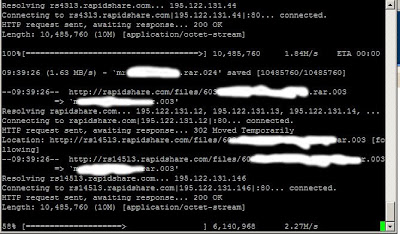
Rapidshare wget console for linux
OK so I have a nice connection both at work and home, trouble is both of them have fair usage policys, which basically suck when I want some stuff from rapidshare.
Now this little trick requires a few things, they are:
1, a premium RS account (its cheap you wasters!)
2, You need to log into your account via a normal webbrowser ONCE to set a setting
3, access to a console on a *nix box ;)
OK so first go into your normal browser like FFx or IE and log into your premium account, and goto the settings and select the tick box for "direct downloads", now save that and log out - from here on in you can use console :)
ok now in your console type the following;
wget --save-cookies=rscookie -q --post-data="login=[user]&password=[password]" https://ssl.rapidshare.com/cgi-bin/premiumzone.cgi
obviously replace [user] and [password] with your account details (and minus the []'s)
Now create a list of links you want to download and call it something like "links"
now all you have to do is loop over the urls in the links folder and supply the cookie from earlier
for i in `cat links`; do wget --load-cookies=rscookie $i;done
and your done :D
Now this little trick requires a few things, they are:
1, a premium RS account (its cheap you wasters!)
2, You need to log into your account via a normal webbrowser ONCE to set a setting
3, access to a console on a *nix box ;)
OK so first go into your normal browser like FFx or IE and log into your premium account, and goto the settings and select the tick box for "direct downloads", now save that and log out - from here on in you can use console :)
ok now in your console type the following;
wget --save-cookies=rscookie -q --post-data="login=[user]&password=[password]" https://ssl.rapidshare.com/cgi-bin/premiumzone.cgi
obviously replace [user] and [password] with your account details (and minus the []'s)
Now create a list of links you want to download and call it something like "links"
now all you have to do is loop over the urls in the links folder and supply the cookie from earlier
for i in `cat links`; do wget --load-cookies=rscookie $i;done
and your done :D

Friday, 22 August 2008
Occurance...
It has just occured to me that all the posts that I transfered over from aheadofthetimes.co.uk are in the wrong bloody order, they will have to stay this way because I can not be bothered to reverse the order...so erm from this point downwards its all just for archieving purposes...from this point up its going to be new posts only.
sorry for the stupid error :(
FC
sorry for the stupid error :(
FC
Subscribe to:
Posts (Atom)
